Let’s cut to the chase. If you’re looking to start futures trading, you’re no longer just dipping your toes in; you’re swimming into deep waters where real capital can be made and completely lost. It’s a game of leverage, timing, and, above all, disciplined risk management. WEEX provides a solid platform for this high-stakes environment. Having navigated multiple market cycles, I’ll walk you through a realistic, step-by-step guide to trading futures on WEEX, blending the mechanics with the hard-earned wisdom you need to survive and thrive.
Why Futures? And Why WEEX?
A futures contract is simply an agreement to buy or sell an asset (like Bitcoin) at a predetermined price on a future date. Unlike spot trading, where you buy the asset outright, futures allows you to speculate on price direction. This means you can profit not only when you think prices will rise (going Long) but also when you believe they’ll fall (going Short). It’s this two-way street that opens up opportunities in any market condition.
WEEX stands out for a few pragmatic reasons that matter to a trader:
Capital Efficiency: The leverage offered allows you to control a large position with a relatively small amount of capital (your margin). This amplifies potential returns but amplifies losses just as fast.
A Focus on Security: In a space rife with risk, WEEX’s robust security protocols, including mandatory 2FA, are non-negotiable for safeguarding your funds.
Low Fees & Advanced Tools: Competitive fees preserve your profits, while the professional-grade charts and real-time data are essential for making informed decisions, not gambles.
Steps to Get Started with WEEX Futures
Step 1: Register/Log In, Deposit, and Transfer Funds to your Futures Account
I’m assuming you’ve already set up and secured your WEEX account. If not, handle that first by tapping the button below to enjoy exclusive USDT and WXT bonuses worth up to $30,000. Also, watch the YouTube tutorial below to understand how to register, deposit, and transfer your funds from your Spot/Funding account to your Futures account.
Join WEEX (Claim $30,000 in Bonuses)
Step 2: Familiarize yourself with the Futures Interface
Navigate to the Futures Trading section. Select USDT-MFutures from the drop-down as shown in the image below. To test the waters, you can opt for Demo Trading which allows you to trade Futures without using your own capital.

The Futures interface is more advanced compared to the Spot market, so take a moment to orient yourself. You’ll see the order book, live price charts, your potential trading pairs (e.g., ETH/USDT), open orders, and your position information. I know these terms are new to you, that’s why I’ve made a glossary list, at the end of this article, for all the Futures Trading jargon you’ll need to know.
Step 3: Choose Your Futures Contract, Leverage, and Margin
Select the Futures pair you want to trade on the top left side of the page. Use the Price Chart to identify potential trading setups based on your patterns or any other technical indicator on WEEX Futures. The Order Book ,on the right, shows the Bids (buy orders) marked in green, starting with the highest price. While Asks (sell orders) show what sellers want, the lowest price first. This real-time list of demand and supply determines the market price, with the difference between the highest bid and lowest ask called the spread.

Now, before you place a single order, two critical decisions will define your risk profile:
Setting Your Leverage:
Leverage allows you to control a larger position with a smaller initial investment, amplifying potential profits (but also increasing potential losses). WEEX offers flexible leverage up to 400x. While it’s tempting to max it out, seasoned traders use leverage as a precise tool, not a blunt weapon. Choose based on your strategy and risk tolerance, not greed.

Choosing Your Margin Mode:
This is crucial for risk management.
- Isolated Margin: Your margin is allocated to a single position. If that trade goes south, your maximum loss is capped to that allocated amount. It’s my default recommendation for beginners—it forces discipline and contains damage.
- Cross Margin: Your entire Futures balance is used as margin for all open positions. It reduces your chance of liquidation on one trade but puts your entire capital at risk across all trades.

Step 4: Execute Your Trade
With your parameters set, it’s time to place your Futures order.

Order Type: Use a Limit Order to specify the exact price you want your order filled [your Entry price]. Use a Market Order only when speed is absolutely critical, accepting the slightly worse slippage.
Position Size: From your Futures account available balance, here, you’ll be able to select the amount of USDT you want to use as the margin for your Futures position.
- Set TP/SL : Before confirming your Buy/Sell order, ALWAYS set your Take-Profit (TP) and Stop-Loss (SL) orders. A Stop-Loss automatically closes your position at a predetermined loss level, protecting you from being Liquidated. Take-Profit on the other hand, locks in gains at your target price. This is how you systemize your exits and remove emotion from the equation.
- Direction: Click Buy/Long if you believe the price will rise. Click Sell/Short if you believe it will fall, as per your analysis.
Step 5: Monitor your Futures Position
Congratulations!! Your Futures trade is now live on the Futures market!
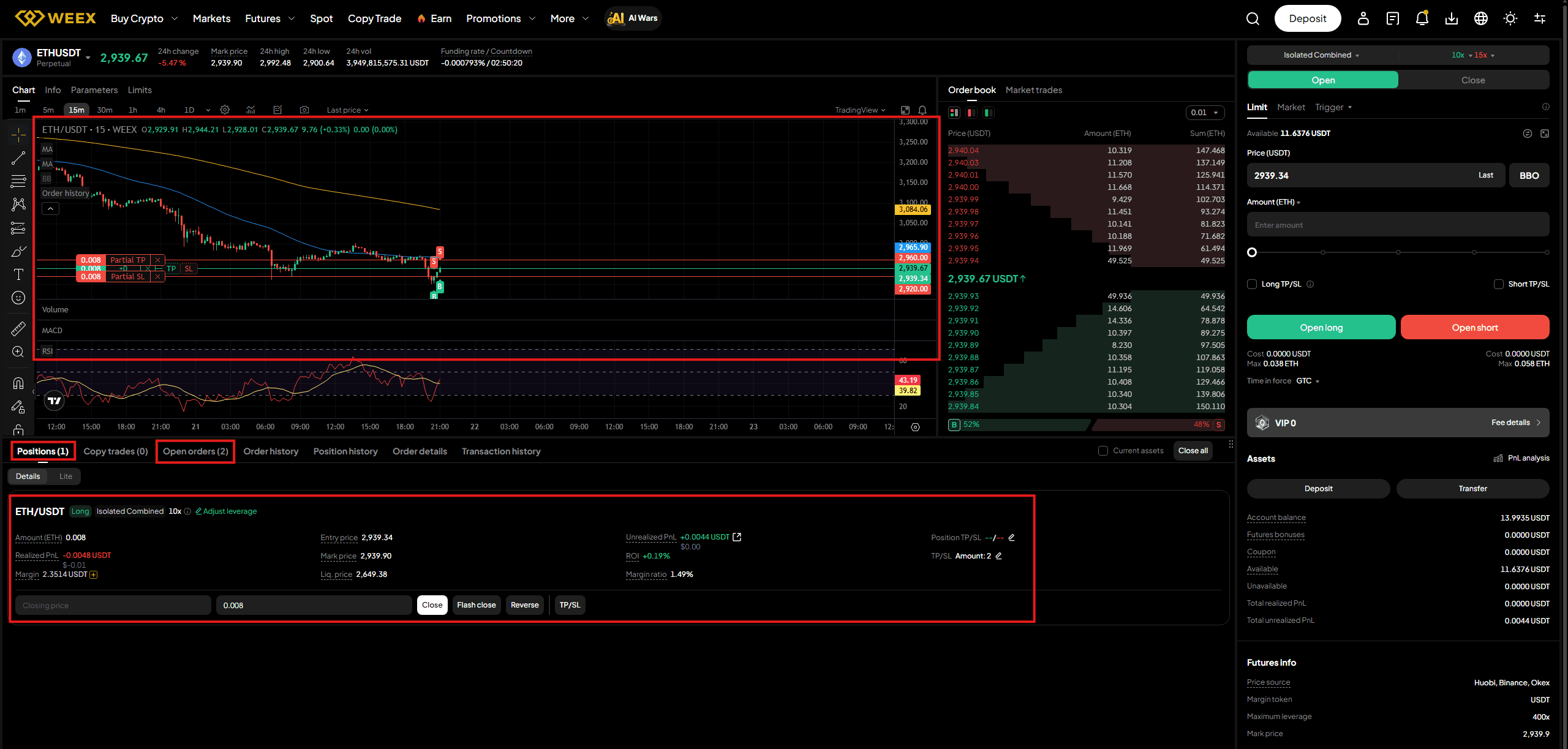
You’ll find your open trade under the Position panel, while your TP and SL orders will be displayed under the Open orders panel. In your open position, you’ll find your unrealized P&L (Profit and Loss), which will be in green if the market is moving as predicted or in red if the vice versa has occurred. But don’t stare at it obsessively. More importantly, monitor your margin ratio. This tells you how close you are to a liquidation, which happens when the margin rate hits 100% (meaning your allocated funds are insufficient to cover the position). A Margin call notification and email will be sent requesting you to either add funds to your position or reduce your positions, since your futures margin rate is 70% or higher, to avoid automatic closure of the trade.
Step 6: Closing Your Futures Trade
You can close your position manually at any time by hitting the Close button, which executes a market order. However, if you followed the entire process on Step 4, your TP or SL will handle this automatically based on your predefined plan. This is the hallmark of a disciplined trader.

Futures Psychology Rules
Risk Management is Your #1 Job: Never risk more than 1-2% of your capital on a single trade. Use stop-losses religiously.
Leverage is a Double-Edged Sword: It’s not about how much you can use, but how much you should use. Start low.
Have a Plan for Every Trade: Enter why you’re entering, where you’ll take profit, and where you’ll admit you’re wrong (stop-loss). Write it down.
The Market is Always Right: Don’t fall in love with your thesis. If the market proves you wrong, your stop-loss gets you out to fight another day.
Glossary: Key Futures Trading Terms
Cross Margin: A margin mode where your entire futures wallet balance is used as collateral for all open positions.
Futures Contract: A legal agreement to buy or sell an asset at a predetermined price at a specified time in the future.
Isolated Margin: A margin mode where margin is allocated and risk is contained to a single, specific position.
Leverage: Using borrowed capital to multiply the potential return (and risk) of a position. E.g., 10x leverage turns a $100 margin into a $1,000 position.
Liquidation: The forced closure of a leveraged position by the exchange when the margin balance falls below the maintenance requirement, resulting in a total loss of the margin for that trade.
Long (Buy): A position that profits from an increase in the asset’s price.
Margin: The collateral you deposit to open and maintain a leveraged position.
Short (Sell): A position that profits from a decrease in the asset’s price.
Slippage: The difference between the expected price of a trade and the price at which it is actually executed.
Spot Trading: The immediate purchase or sale of an asset at its current market price.
Stop-Loss (SL): A pre-set order that automatically closes a position to limit a loss.
Take-Profit (TP): A pre-set order that automatically closes a position to secure a profit.
Conclusion
Futures trading on WEEX is a powerful way to engage with the crypto markets. It can hedge your portfolio, speculate on volatility, and improve capital efficiency. But it is not a shortcut to easy wealth. It is a skill, honed through education, disciplined strategy, and cold, hard experience. Start small, prioritize risk management above all else, and never stop learning. The market is a brutal teacher, but for the disciplined, it is also a great provider. Trade wisely.